“We’ve tried running ads and they didn’t work.”
“We’ve been burned before.”
“That’s what the other agency said.”
If you’re a contractor, you’ve heard the promises. You’ve spent money on marketing with little to show for it. It feels like you’re just guessing.
You might think you have a lead problem, but that’s not the whole story.
The real problem is invisibility.
Your business is probably well-known in your hometown. But just 10 miles away, you don’t exist when someone searches for your services. They search for “[your service] near me,” and Google shows them competitors in their city, not you.
Why?
Because you’ve never told search engines you work there. It seems obvious once you hear it. Why would they assume you work in a city you’ve never mentioned?
Your website just sits and waits for traffic that never arrives. Big companies buy visibility; many smaller contractors rely on hope.
It’s time for a system. A system that creates visibility and turns it into calls. This guide covers the tactics that fuel a real lead generation system for contractors. It’s not about trendy gimmicks. It’s about getting in front of real customers in all the cities you serve.
1. Target the Right Cities to Expand Your Footprint
Your work is defined by geography. If a potential customer is outside your service area, they aren’t a customer. The most critical practice is to use location targeting to align your ad spend with the exact cities and zip codes where you work. This stops you from wasting money on people you can’t serve.
The core problem for most contractors is being invisible outside their home base. You might be the go-to company in your town, but ten miles away, nobody knows your name. When a homeowner searches for your service, they are shown local results. If you haven’t told platforms like Facebook you serve their specific town, you simply won’t appear.
Ads put you in front of these buyers. Precise location targeting is how you do it.
How to Use Local Targeting
This approach ensures your ads are only seen by people within your operational footprint. For example, a septic installer can focus its budget on rural communities 25-75 miles away. A regional HVAC business can target each of its 15 service cities.
The goal is to be visible where it matters. If a customer doesn’t find you when they search for your service in their city, you have no chance of winning that job.
Here are the steps:
- Map Your Territory: Before you spend a dime, create a clear map of every city and zip code you serve. This “Visibility Map” is the blueprint for your ad campaigns.
- Use Location Exclusions: Exclude areas you don’t work in. If you don’t work in the next county over, add it as an exclusion to prevent wasted clicks.
- Test New Markets: If you’re expanding, run a small test campaign in the new city first. Prove there is demand before you commit your full budget.
- Separate Campaigns by Region: Don’t lump all locations into one campaign. Create separate campaigns for each major city. This shows you which areas generate calls and which do not.
Combining paid ads with a website built to convert visitors from specific towns creates a system for generating leads. For more on this strategy, see these details on Facebook ads for local businesses.
2. Send Ad Traffic to a Page Built for One Thing: Phone Calls
Sending Facebook ad traffic to your website’s homepage is a common mistake. A homepage is a general overview. An ad clicker needs a specific answer to a specific problem. Direct ad traffic to a dedicated page built for one purpose: turning that click into a phone call. This removes distractions and makes it simple for a customer to act.
The core issue is friction. A homeowner looking for septic installation doesn’t want to navigate your “About Us” page. They need to know if you provide the service they need in their town, and they want proof that you do good work. A landing page focused on a single service and location confirms this instantly. It presents clear service details and features prominent click-to-call buttons.
How to Build Pages That Convert
This strategy ensures every dollar spent on ads sends visitors to a page designed to get a response. An excavation company can build separate pages for “site preparation in [City A]” and “land clearing in [City B],” matching the ad’s message directly to the page’s content.
The goal is to make getting a quote the easiest next step. A landing page is a direct path from problem to solution.
Follow these steps:
- One Page, One Service: Create a unique page for each core service you advertise. A page for residential septic repair should be different from one for commercial installation.
- Make the Phone Ring: Place a “Click to Call” button in the header and footer of the page so it is always visible on a phone.
- Show, Don’t Just Tell: Include 3-5 recent customer testimonials with names and project photos.
- Keep Forms Simple: If you use a contact form, limit it to the essentials: name, phone, email, and service needed. Anything more lowers your conversion rate.
- Build Instant Trust: Clearly display trust signals like “Years in Business” and license numbers. This shows you are a professional operation.
Targeted ads combined with optimized landing pages are part of a true lead generation system. To see how these pages are structured, explore the principles behind lead generation website design.
3. Stop Wasting Money on People Who Don’t Need You
One of the most effective advertising practices is to stop wasting money on cold, uninterested audiences. Instead, focus your ad spend on people who have already shown interest in your services. This is done by creating audiences of people who have visited your website and audiences modeled after your best customers. For contractors, this means you can directly reach people already searching for your services.
The core issue contractors face is that broad advertising reaches people who will never need their services. Showing ads for septic installation to someone in a high-rise apartment is a waste. Smart audience targeting solves this by narrowing your focus to warm prospects. You can retarget a homeowner who just viewed your “water damage services” page, putting your ads in front of the right people at the right time.
How to Use Audience Targeting
This strategy ensures your budget is spent on prospects most likely to convert. For example, an HVAC company can show a special offer to people who visited their “emergency AC repair” page but didn’t call. An excavation contractor can build an audience from a list of their highest-value clients to find more property owners planning large projects.
The goal is to spend your ad dollars on conversations, not just clicks. Targeting warm audiences filters out the noise and connects you with active buyers.
Follow these steps:
- Start with Website Visitors: Create an audience of everyone who has visited your website in the last 180 days. These are your highest-intent prospects.
- Build Audiences from Your Best Customers: Upload a customer list (names, emails, phone numbers) to create an audience. Facebook will find new users with similar characteristics.
- Use a 1-3% Similarity Match: When creating a lookalike audience, start with a 1-3% match for the highest relevance.
- Exclude Existing Customers: Create an audience of your past customers and exclude them from new lead generation campaigns to avoid wasted money.
- Separate Your Messaging: Talk to previous website visitors differently than you talk to new prospects. Remind retargeting audiences why they visited your site in the first place.
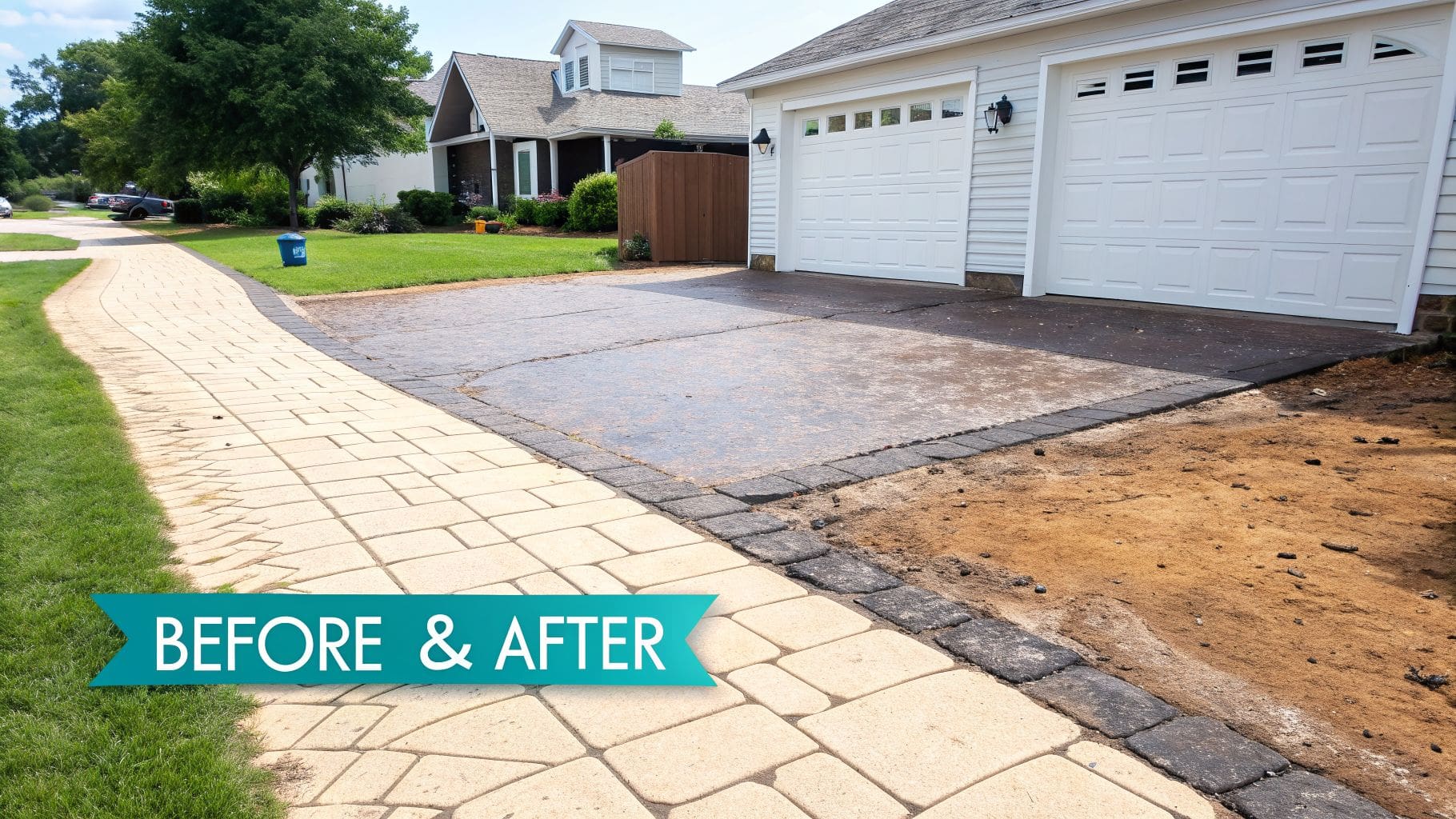
4. Show the Transformation, Don’t Just Talk About It
For contractors, showing is always better than telling. Generic ads talk about quality. Ads with before/after photos provide undeniable proof. Move away from one-size-fits-all campaigns and create ads that visually demonstrate the exact transformation you deliver for each of your core services. This shows potential customers exactly what they get when they hire you.
The central problem for many contractors is that homeowners can’t visualize the final result. They see an overgrown lot or a cracked driveway and feel overwhelmed. Your ads need to cut through that uncertainty by showing the finished product. An excavation company showing a cleared lot ready for construction is far more convincing than an ad that just lists “land clearing services.” Visual proof builds instant trust.
How to Use Service-Specific Images
This approach ensures your ads resonate with buyers looking for a specific solution. For instance, a restoration company can run separate ads showing a flooded basement returned to pristine condition. A concrete contractor can showcase finished patios. Each ad speaks directly to a customer’s immediate need.
The goal is to make your capability tangible. When a customer sees a photo of a completed job that looks just like their own project, they are more likely to believe you can help them.
Follow these steps:
- Create a Before/After Library: Take high-quality before and after photos of every major job. Collect 2-3 new sets each month to keep your ad creative fresh.
- Show Your Team and Equipment: Include your crew and equipment in action. Photos of your team on-site add a human element and build trust.
- Use Carousel Ads for Storytelling: A carousel ad is perfect for showing multiple stages of a project or several different before/after examples in a single ad.
- Add Context with Text Overlays: Add simple text overlays to your images, such as the service and location (e.g., “Septic Install – Lancaster, OH”). This makes the results feel local and relatable.
When you fuel your Lead Machine with ads that feature compelling visual proof, you stop telling people you’re the best and start showing them. This drives calls from serious buyers.
5. Separate Ads by Customer Type and Job Size
Not all customers are the same, and not all jobs are worth the same amount. A homeowner needing a septic repair is a different buyer than a developer planning a new subdivision. Segment your ad campaigns by customer type and job size to ensure your message hits the mark. This stops you from showing a “small repair” ad to a contractor looking for a six-figure site prep partner.
The problem with generic advertising is that it speaks to no one. A restoration company trying to attract both a homeowner with a flooded basement and an insurance adjuster with one ad will fail. The homeowner’s pain point is urgent, while the adjuster’s is professional. When you speak directly to a specific audience about their specific problem, your ads become relevant and drive action.
How to Use Audience Segmentation
This approach ensures your ad, budget, and landing page are aligned with the intended audience. An excavation company can create separate campaigns for homeowners needing a small trench, crews needing full site prep, and developers needing large-scale land clearing.
The goal is to match your message to the person and the job. A high-value commercial lead will ignore an ad that feels like it’s for a small residential handyman job.
Follow these steps:
- Define Your Core Segments: Start by identifying 2-3 primary customer types. For an HVAC contractor, this could be: 1) Homeowners with emergency needs, and 2) Property managers seeking maintenance contracts.
- Create Segment-Specific Landing Pages: A homeowner should land on a page with residential testimonials. A commercial manager should see case studies from other businesses and a form to “Request a Bid.”
- Use Exclusion Targeting: When you run ads for commercial services, actively exclude your residential audiences. This ensures the right people see the right message.
- Review ROI by Segment: Track which segments deliver the best return. If ads for large construction jobs generate a 10x return while residential repair ads only deliver a 2x return, you can shift more budget toward the higher-value work.
6. Track What Works and What Doesn’t
Running ads without tracking is like driving a backhoe with your eyes closed. You can spend the money, but you’ll have no idea what you’re hitting. Tracking tools report back when someone views a service page, fills out a form, or clicks to call you. This tells you what’s working and what’s not.
Without tracking, you’re just guessing. You can see clicks, but you can’t connect your ad spend to actual leads. When tracking is set up correctly, Facebook’s system learns who your best customers are. It then shows your ads to more people like them—the ones most likely to call you for a job. This is impossible without accurate data.
How to Use Conversion Tracking
Proper setup ensures you measure the actions that grow your business, not just website traffic. A restoration company can track every time a visitor engages with a chat widget. An excavation contractor can see which ad campaign led to a submitted quote request.
The goal is to get a clear picture of what’s working so you can stop wasting money on ads that don’t produce calls.
Follow these steps:
- Install the Base Tracking First: The base code must be installed on every page of your website. This is the foundation.
- Set Up Key Events: Track key actions. At a minimum, set up events for when someone lands on a key service page, when a form is submitted, and for calls or scheduled appointments.
- Track Phone Calls Accurately: For click-to-call ads or phone numbers on your site, use a call tracking service. This connects incoming calls back to the specific ad that generated them.
- Upload Offline Conversions: Your job isn’t done when the phone rings. Upload a monthly list of closed jobs into Facebook. This tells the system which leads turned into paying customers, making your targeting even sharper.
7. Use Lead Forms to Capture Information Instantly
For many contractors, the biggest hurdle is friction. Asking a busy homeowner on a phone to leave Facebook, wait for your site to load, find a form, and type in their information is asking them to give up. A Facebook Lead Form Ad removes these steps, letting prospects submit their information directly within the Facebook app.
This approach is perfect for capturing initial interest. Because the form pre-fills with the user’s name and phone number, they only need a few taps to send you their information. This turns passive scrollers into active leads without making them visit your website first.
How to Use Lead Form Ads
This strategy works best for campaigns where the goal is to start a conversation. An excavation company can use a lead form to capture initial inquiries, then have their team follow up to schedule a free estimate call. A restoration company can use them during storm season to quickly collect contact info from homeowners needing help.
The goal is to make it as easy as possible for a customer to raise their hand. A simple, in-app form removes the barriers that cause most people to abandon the process.
Follow these steps:
- Keep Your Form Short: Stick to the essentials: name, phone number, location, and service needed. Aim for five questions maximum.
- Integrate with Your System: Connect your lead forms to your business management software. This ensures every new lead is sent to your team for immediate follow-up.
- Set Clear Follow-Up Expectations: On the form’s “thank you” screen, tell people when they can expect a call. A message like, “Thanks! Our team will call you within the next 2 hours,” sets a professional tone.
- Retarget Your Submissions: Retarget these warm leads with ads that send them to a dedicated landing page on your website, featuring a click-to-call button to move them closer to a final decision.
8. Test Your Message to Find What Works
Even the best-targeted ad will fail if the message doesn’t convince a customer to act. Continuously test your ad copy. The words you use in your headline, body text, and call-to-action button directly impact whether a homeowner ignores your ad or clicks to call you. Small adjustments can lead to massive improvements.
The difference between a failing campaign and a successful one often comes down to a few words. An excavation contractor might find that “Licensed & Insured” gets ignored, but “25+ Years Experience” gets calls. A restoration company might see a huge lift by changing their button from “Learn More” to “Get Instant Help.” Without testing, you are simply guessing.
How to Test Ad Copy
The goal is to find the exact combination of words that makes potential customers feel understood and confident enough to contact you. This process isolates one variable at a time to determine what works best. For example, a septic company can test “Free Septic Inspection” vs. “No-Obligation Septic Quote” to see which phrase generates more qualified leads.
The words you choose are the engine of your ad. Testing them is how you build a campaign that consistently produces calls and jobs.
Follow these steps:
- Test One Variable at a Time: To get clear results, only change one element per test. Test two different headlines while keeping the copy and image the same.
- Focus on Benefits and Proof: Start by testing benefit-driven copy (e.g., “Get Your Project Done Right”) against feature-driven copy (e.g., “We Use Modern Equipment”).
- Vary Your Call-to-Action: The button text is crucial. Test direct commands like “Call Now” against softer options like “Get Quote.” Mastering effective social media lead generation tactics is crucial, including the use of native lead forms.
- Document Everything: Keep a simple spreadsheet of every test you run. This log becomes your playbook for what resonates with your customers.
By systematically refining your messaging, you improve your results over time. To learn more about creating ads that get a response, review these super simple ad strategies.
9. Stop Annoying People with the Same Ad
If you’ve run ads that started strong only to die off, you’ve seen ad fatigue. It happens when the same people see the same ad over and over. They become blind to it, and your results tank. You must actively manage ad frequency and rotate your creative to keep your message fresh.
The core problem is repetition. When a potential customer sees your ad for the fifth time in a week, they either ignore it or get annoyed. This causes your costs to climb, wasting your budget. For most contractors, the ideal ad frequency is showing an ad to a person one to three times per week. Anything more, and you’re paying to make yourself invisible.
How to Rotate Your Ads
This strategy keeps your ads effective by swapping out images, videos, and headlines before your audience gets bored. An excavation contractor can rotate four different before-and-after photo sets of a recent job. A restoration company can cycle through video testimonials. The key is to have new material ready.
High ad frequency is a hidden budget killer. If the same people see the same ad too many times, you are paying for them to ignore you.
Follow these steps to avoid ad fatigue:
- Build a Creative Library: Plan ahead. Have 4-8 different images or videos ready to deploy each month. This gives you options when performance fades.
- Monitor Frequency Weekly: Check your ad frequency metric every week. If it creeps above an average of 3, it’s a signal that your audience is saturated. It’s time to rotate your ads.
- Watch for Performance Dips: If your click-through rate drops significantly, swap in a new creative immediately. This is a direct sign of ad fatigue.
- Rotate Losers, Keep Winners: Pause underperforming ads after a week or two and replace them. Let your winning ads run longer, but always have a backup ready.
10. Scale Your Budget the Right Way
Once you find an ad campaign that works, the next challenge is getting more leads without your costs spiraling out of control. This is where strategic budget allocation comes in. Proper scaling isn’t about just doubling your ad spend; it’s about intelligently directing money to winning ads and telling Facebook how to bid for new customers. This is critical for growth.
The core problem contractors face when scaling is unpredictability. You have a good month, so you increase your budget, but your cost per lead skyrockets. This happens when you don’t have a system for growth. Instead of guessing, you need a methodical approach that allocates budget based on performance. This allows you to grow your business predictably.
How to Optimize Your Budget
This approach helps you put more fuel behind what’s already working. A restoration company might find that residential water damage ads are highly profitable. They can allocate 60% of their budget there while using the remaining 40% to test commercial fire damage ads. An HVAC contractor can set a target cost of $25 per lead for furnace repair and $40 per lead for a new system installation.
The goal is to scale your lead flow predictably. You need a system that grows your budget in a controlled way, based on what is proven to work.
Follow these steps:
- Start with Lowest Cost Bidding: When launching a new campaign, let Facebook’s system find the cheapest results first. This gives you a baseline for performance.
- Scale Budgets Gradually: Never double your budget overnight. Increase spending on successful campaigns by 10-20% weekly to avoid disrupting the system.
- Use Target Cost for Stability: Once a campaign is converting consistently, switch to a Target Cost bid strategy to keep your cost-per-lead stable as you scale.
- Separate Budgets for Testing vs. Scaling: Allocate 85-90% of your budget to proven campaigns. Use the remaining 10-15% to test new audiences or ads without risking your core results.
- Use ROAS Bidding with a CRM: Only use Return on Ad Spend (ROAS) bidding if you have a system that tracks job revenue back to a specific ad. This tells Facebook to optimize for a specific profit target.
Effectively maximizing your return with robust PPC management for small business is crucial for scaling your advertising efforts. A managed approach ensures you are spending smarter, not just spending more.
10-Point Facebook Ads Best Practices Comparison
| Strategy | 🔄 Implementation Complexity | ⚡ Resource Requirements & Speed | 📊 Expected Outcomes | 💡 Ideal Use Cases | ⭐ Key Advantages |
|---|---|---|---|---|---|
| Leverage Local Audience Targeting for Multi-City Service Areas | 🔄 Medium — city/radius setup; mapping required | ⚡ Low–Moderate — quick to deploy in Ads Manager | 📊 Higher ROI; reduced out-of-area spend | 💡 Multi-city contractors, regional expansion tests | ⭐ Maximizes budget efficiency for service areas |
| Use High-Converting Lead Generation Landing Pages with Click-to-Call | 🔄 Medium–High — page creation + optimization | ⚡ Moderate — design/dev time; immediate phone captures | 📊 Large conversion lift (50–300% vs homepage) | 💡 Mobile-first users, instant-call services | ⭐ High conversion and immediate lead capture |
| Target High-Intent Keywords in Custom & Lookalike Audiences | 🔄 Medium — build pixel audiences and lists | ⚡ Low–Moderate — needs traffic/data to mature | 📊 Lower CPA; higher lead quality | 💡 Businesses with existing customer data/traffic | ⭐ Efficient warm-targeting; scalable via lookalikes |
| Implement Service-Specific Ad Creative with Before/After Imagery | 🔄 Medium — ongoing creative production & testing | ⚡ High — photography/video production; slower refresh | 📊 Higher engagement and CTR (2–5x typical) | 💡 Visual trades and high-ticket projects | ⭐ Visual proof builds trust and increases conversions |
| Segment Ad Campaigns by Customer Type and Job Size | 🔄 High — multiple campaigns, tracking per segment | ⚡ Moderate–High — separate landing pages and analytics | 📊 Better conversion alignment and ROI control | 💡 Mixed residential/commercial or varied job sizes | ⭐ Tailored messaging improves relevance and ROI |
| Set Up Proper Facebook Pixel Implementation and Conversion Tracking | 🔄 High — technical install and server-side setup | ⚡ Moderate — developer time; needs data accumulation | 📊 Accurate ROI measurement; enables optimization | 💡 Any advertiser needing measurable results | ⭐ Foundation for optimization and retargeting |
| Use Lead Form Ads to Capture Prospects Without Site Friction | 🔄 Low — ad-level setup; CRM integration advised | ⚡ Low — fast to launch; instant submissions | 📊 Higher submission rate but lower initial qualification | 💡 Top-of-funnel, mobile audiences, cold prospects | ⭐ Quick capture with pre-filled user data |
| Test and Optimize Ad Copy, Headlines, and CTA Button Text | 🔄 Medium — structured A/B testing process | ⚡ Moderate — budget and time to reach significance | 📊 Incremental CTR and conversion gains over time | 💡 Ongoing campaigns seeking efficiency improvements | ⭐ Data-driven optimization that reduces wasted spend |
| Manage Ad Frequency and Combat Ad Fatigue with Creative Rotation | 🔄 Medium — scheduling and monitoring required | ⚡ High — continuous creative production & rotation | 📊 Maintains CTR/CPL and extends campaign lifespan | 💡 Long-running or narrowly targeted campaigns | ⭐ Prevents performance decay and audience annoyance |
| Leverage Budget Allocation and Bid Strategy Optimization for Scaling | 🔄 Medium — strategic planning and monitoring | ⚡ Moderate — budget for learning; analytics needed | 📊 Scalable lead volume with controlled costs when mature | 💡 Proven campaigns ready to scale regionally | ⭐ Enables automated scaling and improved ROAS when data exists |
A System for Predictable Leads Gives You Control
Focusing on individual tactics without a solid system is like trying to build a house with a great hammer but no blueprint. You might get a wall up, but it won’t be a reliable structure.
The real problem for most contractors isn’t a lack of effort. It’s a lack of visibility. You are likely well-known in your hometown, but what about the next town over? When a homeowner 15 miles away searches for “septic installation near me,” their phone tells Google they are in their city. If you haven’t made it clear you work there, you won’t show up. You are invisible.
Why Tactics Alone Fail
Many contractors have been burned by agencies. They talk about running ads, but where do those ads lead? To a generic website that doesn’t convert? This is where money gets wasted.
- Ads without a conversion tool burn cash. Pouring money into ads that send people to a weak website is like paying for a Super Bowl commercial that directs viewers to a disconnected phone number.
- A website without traffic is a billboard in the desert. A high-end website that no one ever sees is useless. It can’t generate a single call if customers can’t find it.
This is the cycle of frustration that makes contractors feel like marketing is a guessing game. It’s not. Big companies don’t guess. They buy visibility and direct it into a system designed to create customers.
Building Your Lead Machine
The solution is a complete system. You need two parts working together: a machine that turns traffic into leads, and the fuel to make that machine run.
- The Asset (Your Lead Machine): This is a website built for one purpose: to get you calls. It is structured to show up in all the cities you service, not just your hometown. Every page and every button is designed to convince a visitor to call.
- The Fuel (Paid Ads): This is targeted visibility. Ads put your services directly in front of homeowners in all the areas you want to work. They are the fuel that drives high-intent traffic to your Lead Machine.
When you combine these, you create a predictable, scalable system. The best practices we’ve discussed are how you make the fuel more efficient. But without the engine of a high-converting website, that fuel is wasted.
Predictable leads give you control. Control means you can stop taking every small, low-profit job. It means you can focus on the bigger, more profitable projects you want. You can hire another crew because you know the work will be there.
A business without control is fragile. It’s always one slow month away from serious trouble.
You might think customers can find you. But if they don’t find you immediately when they are searching, nothing else matters. A system ensures they find you, every time.
At The Cherubini Company, we build the exact systems that give contractors control. We don’t just run ads; we build the Lead Machine asset first and then provide the fuel to generate predictable calls. If you’re tired of guessing and ready for a system that works, learn more at The Cherubini Company.