Look, if you want your phone to ring with jobs, Google Ads is the fastest way to make it happen. It puts your business right in front of homeowners who are looking for exactly what you do, right now.
Think about it. When someone’s pipe bursts, they’re not scrolling Facebook for fun. They’re grabbing their phone and typing “emergency plumber near me” or “roof repair quotes.” Google Ads lets you be the first name they see. It’s like having a salesperson working for you 24/7, catching hot leads the second they pop up. You can do this!
Turn Your Business into a Lead Machine

You’re a pro at your trade, but maybe not a marketing guru. That’s totally fine. You don’t need to be. Think of your business like a powerful truck; Google Ads is the high-octane fuel that makes it go. And a good website design is the shiny paint job that makes people trust you.
Instead of just waiting for jobs to trickle in, you can grab the steering wheel. You decide when to hit the gas and when to ease off. It’s a super simple way to fill gaps in your schedule and keep your crew busy. It turns your website into a true lead machine.
Skip the Waiting Game
Relying on referrals alone is like waiting for it to rain to fill a bucket. Sure, it works eventually, but you have no control. Google Ads is like turning on a faucet whenever you need more work.
You can start getting calls almost right away. The whole point is to show up at the exact moment a customer needs you most. You can do this, and we can help if you get stuck.
A homeowner searching for “leaky faucet repair” isn’t just browsing—they’ve got a problem that needs fixing now. Your ad showing up at the top is the fastest way to become their hero.
This is all about action. It’s about connecting your skills with the people who need them and are ready to pay for them. Getting this set up isn’t rocket science, and the results can be a game-changer for your business.
Is It Worth the Cost?
Now, you’re probably wondering what this costs. Let’s be real—your business can be a competitive space on Google. The average cost for a click for contractor ads is around $6.55 in the United States. But don’t let that number scare you off.
Think about how much one good job is worth. If a click costs you $7 but lands you a $2,000 project, you’ve made a massive return. You don’t need thousands of clicks. You just need the right clicks from serious customers in your town. We break down how to fuel your leads with Google Ads in more detail in our guide.
This guide will show you exactly how to get started, step-by-step. We’ll cover everything from picking the right ad to writing an ad that actually makes people call you. It’s simpler than you think.
Choosing the Right Google Ad Campaign
Jumping into Google Ads can feel like walking into a giant hardware store for the first time. There are a million options, and they all look kinda the same. Don’t worry, we’ll skip the confusing stuff and focus on the three best tools for contractors.
Think of it this way: you wouldn’t use a sledgehammer to hang a picture frame. The same idea applies here. Picking the right campaign is the first step to making your phone ring with real, paying customers instead of people just kicking tires. Let’s make this simple.
Deciding where to start can feel tough. Let’s break down the best options so you can pick the right tool for the job.
Which Google Ad Campaign Is Right for You?
| Campaign Type | Best For | What It Looks Like | Effort Level |
|---|---|---|---|
| Search Ads | Contractors who want to pick the exact words people search for to find them. | Classic text ads at the top of Google search results. | Medium |
| Local Services Ads | Most home service pros (plumbers, HVAC, electricians) who just want the phone to ring. | “Google Guaranteed” boxes at the very top of the page. | Low |
| Performance Max | Contractors ready to grow and let Google’s computer brain find customers everywhere. | A mix of pictures, videos, and text ads across the whole internet. | Low (to start) |
Each of these campaigns works, but they work differently. Let’s look at them like different trucks in your business.
Your Trusty Work Truck: Search Ads
Google Search Ads are the classic, reliable choice. They’re your digital work truck—dependable, simple, and great at getting the job done.
When a homeowner in your town types “emergency roof leak repair” into Google, these are the text ads that pop up right at the top. You get to pick the exact words you want to show up for, which gives you a ton of control.
If you only do kitchen remodels, you can tell Google to only show your ad to people searching for that. This direct approach makes them a powerful tool for turning searchers into leads. This is a fantastic way to build a solid lead machine.
The Shiny Branded Van: Local Services Ads
Ever seen those boxes at the very top of Google with a green “Google Guaranteed” checkmark? Those are Local Services Ads (LSAs), and they are pure gold for contractors. Think of them as your shiny, clean work van that instantly tells customers you’re trustworthy.
Getting that little green checkmark means Google checked you out, which is a huge deal to customers. Better yet, you only pay when a customer actually calls or messages you—not just for a click. You pay for a lead, not just a looky-loo. It also helps with your local SEO.
Key Takeaway: With Local Services Ads, you’re not paying for random website visitors. You’re paying for real people in your area who are ready to talk business.
This is a no-brainer for most contractors like plumbers, electricians, HVAC pros, and roofers. It’s made to get you phone calls and 5 star review generation which builds even more trust.
The Self-Driving Vehicle: Performance Max
Performance Max (or P-Max) is Google’s newest, smartest campaign. It’s like a self-driving truck that finds new shortcuts to customers you didn’t even know existed. You give Google your business info, some ad text, and some pictures, and its computer brain does the rest.
P-Max shows your ads everywhere on Google—Search, YouTube, Gmail, Maps, you name it. It learns who your best customers are and then goes out to find more people just like them. It works great with Facebook ads to cover all your bases.
This is great if you want to reach more people or if you’re ready to let Google’s smarts take the wheel. It takes a little trust, but it can be an amazing way to grow your business. For more on this, you can learn about Google Ads for local businesses in our simple guide.
Choosing the right ad is the first step. You can do this. Just pick the “truck” that fits your business, and you’ll be on the road to more leads in no time.
Finding Keywords That Get You Paying Customers
Let’s make this simple. Keywords are just the words real people type into Google when they have a problem you can fix. The secret to making Google Ads for contractors work isn’t some crazy math—it’s about thinking like your customer.
Picture this: a homeowner’s air conditioner dies on a hot day. They are not searching for “advanced cooling systems.” They’re grabbing their phone and typing “emergency AC repair near me.” That’s the keyword. That’s the money.

Your job is to find the words that mean someone is ready to pull out their wallet and hire a pro, right now. This simple way of thinking is what turns your Google Ads from a money pit into a powerful lead machine. You can do this.
Focus on Action and Location
For contractors, the best keywords almost always mix a service with a need for speed or a location. Why? Because people who need help now are the ones who turn into a paying job.
Think about the words that scream “I need help now!”
- Urgent Words: “emergency,” “24/7,” “fix,” “repair,” “same-day”
- Service Words: “plumber,” “roofer,” “electrician,” “leaky pipe,” “broken furnace”
- Location Words: “near me,” “[Your City],” “[Your County],” “[Your Zip Code]”
Mix them together and you get keyword gold like “emergency plumber in Columbus” or “roof leak repair near me.” These are the searches that lead to phone calls and jobs. Stay away from broad stuff like “plumbing”—those are for DIY people, not paying customers.
Avoid the Tire-Kickers
Choosing the right keywords is only half the battle. Just as important is avoiding the wrong ones. You don’t want to waste your ad money on clicks from people who will never hire you. I call these the “tire-kickers”—people looking for DIY tips, jobs, or free advice.
The biggest mistake contractors make with Google Ads is paying for clicks from people who will never hire them. One good keyword can bring you a great project, while a bad one can waste your whole budget.
This is where your secret weapon comes in: negative keywords.
A negative keyword is just a word you tell Google not to show your ad for. It’s like putting a “No Solicitors” sign on your digital front door. By adding a simple list of negative keywords, you can filter out a ton of junk, saving you a bunch of money.
Think about it. You’re a plumber. Do you want your ad showing up when someone searches for “plumbing jobs” or “how to fix a leaky faucet DIY”? Of course not. Those clicks cost you money but bring in zero business.
Your Starter Negative Keyword List
Every single contractor running Google Ads needs a good negative keyword list from day one. It’s one of the fastest ways to get better results and make your money go further. You’re just telling Google, “Hey, if someone types this word, don’t show them my ad.”
Here’s a must-have starter list for any contractor:
- DIY & Info Words: “DIY,” “how to,” “tutorial,” “video,” “guide,” “free,” “cheap”
- Job Words: “jobs,” “hiring,” “careers,” “salary,” “resume,” “employment”
- Competitor Names: Unless you have a good reason, don’t pay for clicks from people already looking for another company.
- School & Supply Words: “school,” “training,” “classes,” “supply,” “parts”
Adding these words to your campaign is a five-minute task that can instantly make your leads better. It makes sure your ad is only shown to people who are looking to hire a pro. It’s a small step that makes a huge difference in turning your advertising into a real lead generation engine.
Writing Ads That Actually Get Clicks and Calls
Think of your Google Ad as a tiny digital billboard on the busiest highway in the world. You’ve got just a few seconds to grab a homeowner’s attention and convince them you’re the one to call. No pressure, right? Ha!
Don’t worry, this is way simpler than it sounds.
Writing an ad that gets clicks isn’t about being a fancy writer. It’s about being clear, direct, and trustworthy. Your goal is to make someone think, “Yes, this is exactly what I need,” and then make it super easy for them to call you. This is how your ad becomes a powerful lead generation tool.
We’re going to break down the simple parts of an ad and show you how to write one that works. You can absolutely do this.
Headlines That Stop the Scroll
Your headline is the most important part of your ad. It’s the big blue text people see first. A bad headline is just your company name, like “Smith Roofing.” A great headline talks right to the customer’s problem and offers a solution.
Think about what a customer with a leaking roof really wants. They want it fixed fast, and they want to know what it’s going to cost.
So, a much better headline would be:
- Fast Roof Repairs | Get A Free Quote Today
- Emergency Plumbing? We’re On Our Way
- Affordable Kitchen Remodels in [Your City]
See the difference? The good headlines are full of action and value. They use the words the customer just typed and tell them exactly what to do next.
Descriptions That Build Trust
Under the headline, you have a little more space to write a description. This is where you quickly build trust and get them to click. Don’t waste this space. Hit them with your biggest selling points, fast.
Here’s a simple formula that works every single time:
- State the problem you solve: “Leaky roof? We offer 24/7 emergency repairs.”
- Add a trust-builder: “Family-Owned for 20+ Years. 150+ 5-Star Reviews.”
- Tell them what to do (call to action): “Call Now for a Fast, Free Estimate!”
Putting it all together, your description gives a customer every reason to choose you. It shows you get their problem, you’re reliable, and you’re ready to help right now. To really make this work, you need to understand the Google Quality Score, because it affects how often your ads get shown and what you pay.
Power-Ups for Your Ad with Extensions
Ad Extensions are like free upgrades for your ad. They don’t cost extra, but they make your ad bigger, more noticeable, and way more helpful. They are your secret weapon for turning an ad into a lead machine.
Think of Ad Extensions as adding a toolbelt to your ad. They give customers quick access to what they need—your phone number, location, or your great reviews—without even visiting your website.
These are a must-have for any contractor running Google Ads for contractors. They make it so easy for a customer to contact you. We have a guide that covers more on creating super simple ads that focus on this.
Here are the must-haves:
- Call Extensions: This adds your phone number right to the ad. On a cell phone, a customer can just tap it to call you. It is the best shortcut to a new lead.
- Location Extensions: This shows your business address and adds you to the map. It’s perfect for proving you’re a real local business.
- Review Extensions: This lets you show off your 5-star review count right in the ad. Nothing builds trust faster than good reviews from happy customers.
Setting Up Your Ads for Local Dominance
You’re a local contractor. So why would you pay for a click from someone three states away? You wouldn’t. That would be silly.
This is where you get smart and tell Google exactly where and when to show your ads so you stop wasting money.
This part is simple, but it’s the secret to making your Google Ads budget work for you. It’s how you turn your ad from a wide-spraying hose into a high-powered washer aimed right at your best customers. It’s a key piece of building a true lead machine.
Let’s make sure every dollar you spend is targeting homeowners in your area who can actually hire you.
Draw Your Digital Fence with Geo-Targeting
Geo-targeting is just a fancy term for drawing a circle on a map around where you work. If you only work within 30 miles of your shop, you can tell Google to only show your ads to people inside that circle. It’s that easy.
Stop burning money on clicks from people you’d never drive to. You can get very specific here:
- By Radius: Show ads to everyone within a 20-mile circle around your business.
- By City or Town: Target specific cities you work in, like “Columbus” or “Newark.”
- By ZIP Code: Drill down to the exact neighborhoods where your best customers live.
This is what makes Google Ads for contractors so great. You decide exactly where your ad shows up, making sure you’re only seen by local homeowners who need you. A strong local presence here also helps your overall local SEO. For more on that, check out our guide on how to optimize your Google Business Profile to own your local market.
Set Your Hours with Ad Scheduling
Now, let’s talk about timing. If you offer 24/7 emergency services, you might want your ads running all the time. But what if you don’t? Why pay for a click at 3 AM if no one is there to answer the phone?
That’s where ad scheduling comes in. It’s another dead-simple tool that saves you a ton of cash.
Think of it this way: you wouldn’t leave the lights on in your shop all night if no one was there, right? Ad scheduling is just flipping the switch off on your ads when you’re not open.
You can tell Google to only run your ads during your business hours—say, Monday to Friday, from 8:00 AM to 5:00 PM. This means that when a customer calls, someone is there to book the job.
This one little change makes your ad money go way further. Every click you pay for comes from a customer who can get a quick response, which makes it much more likely to become a real lead. This is smart marketing you can set up in minutes, and it’s a key part of a solid lead generation strategy that keeps your phone ringing when you want it to.
Your Simple Launch Checklist for More Leads
Alright, you’ve got the plan, and now it’s time for a final check before you launch your new lead machine. This isn’t complicated. Think of it like your final to-do list on a project—a quick check now makes sure everything is set up right.
You don’t need a huge budget to start; you just need to start smart. The goal is to get your ads running, see what works, and build from there. You can do this.
Your Pre-Launch Final Check
Before you hit that big green “launch” button, run through these quick points. Getting these details right from the start makes a huge difference.
- Keywords Are On Point: Did you choose words that show a customer needs help now? Think “emergency plumbing,” not just “plumbing.”
- Negative Keywords Are In: Have you added your list of “tire-kicker” words like “jobs,” “DIY,” and “free”? This stops you from wasting money.
- Your Ad Copy Is Clear: Does your ad headline solve a problem and your description build trust? Does it say “Call for a Free Estimate“?
- Phone Number is Obvious: Is your phone number easy to find on your website? Are you using a Call Extension so people can call right from the ad?
This quick visual guide shows the simple flow for setting up your local ads, from defining your service area to scheduling when your ads actually run.
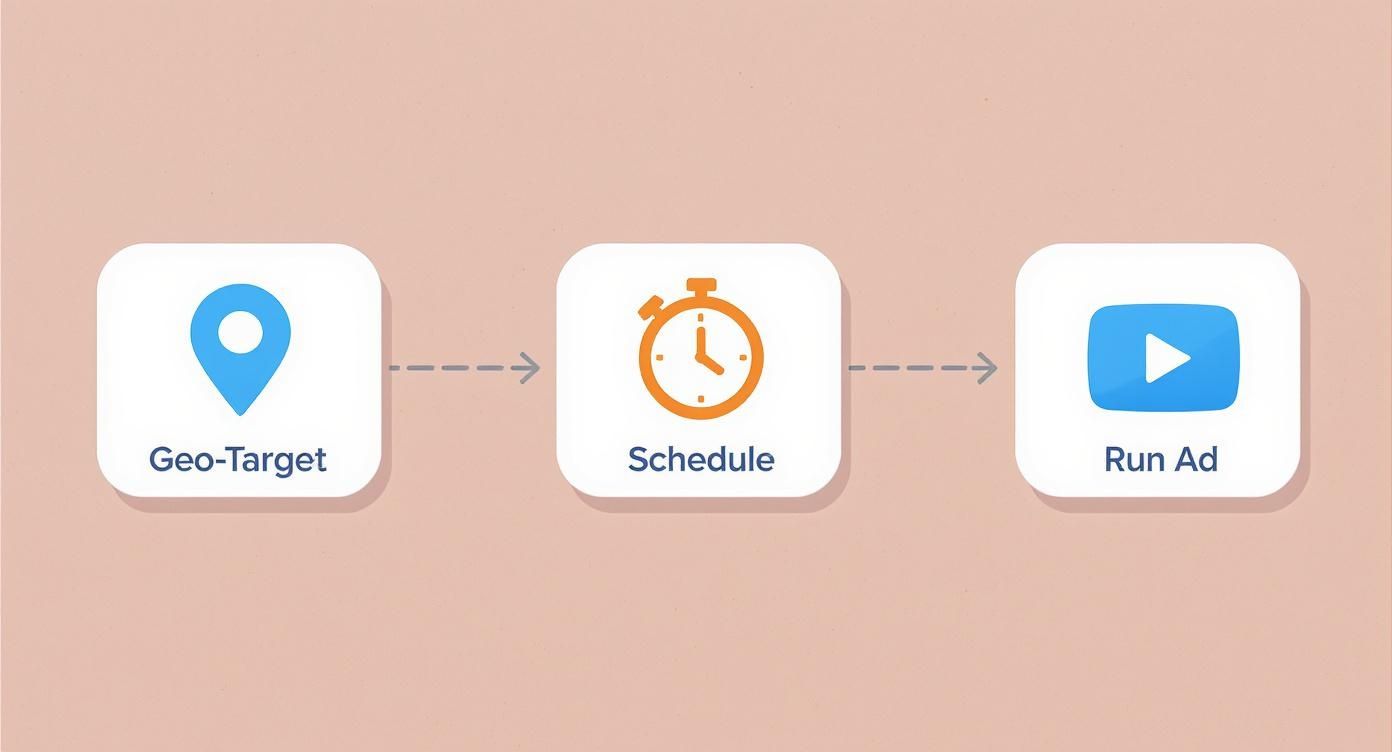
This just shows how a few simple settings make sure your ads are only seen by the right people, at the right time, in your local area.
Answering the Call Every Time
Once your ads are live, the phone will start ringing. But leads don’t wait for business hours. To make sure no lead you pay for is missed, using a 24/7 call answering service is a smart move. Answering every single call is how you get the most out of your ad money.
Final Thought: Your first ad isn’t about being perfect; it’s about taking action. Launch it, see what happens, and make small changes. That’s how you build a powerful, steady lead generation system that keeps your crew busy all year.
And hey, if you try it out and decide you’d rather have an expert handle it, we’re here for you. We can help turn your Google ads and Facebook ads into a reliable machine that brings in great jobs, letting you focus on what you do best. If you want more help, we have a great resource to help you learn how to run your own ads and take full control.
Common Questions I Hear from Contractors
You’ve got questions. Good. That means you’re serious. Let’s get straight to the things contractors ask me before they jump into Google Ads for contractors.
How Much Do I Need to Spend on This?
This is the big one, right? The honest answer is: it depends. But you don’t need a giant budget to get started.
Most contractors I work with start with just $300-$500 a month. The key is to stop thinking about cost and start thinking about what you get back. If you spend $500 on ads but land one $5,000 project, you just made a great investment. The goal isn’t to get the most clicks; it’s to get the right clicks that turn into paying customers. Start small, prove it works, and then you can put more gas in the tank.
Is This Better Than SEO?
It’s not a competition. Google Ads and local SEO are like a hammer and a nail gun—different tools that work great together.
Google Ads gets you results right away. It puts you at the top of the page today. SEO is the long game for building trust and ranking for free, which can take months.
My advice: Use Google Ads to turn your phone into a lead machine now. While that’s running, work on your SEO to build a strong foundation for the future. They work together to make you a local powerhouse.
Can I Just Do This Myself?
Absolutely. You can learn the basics and get a simple ad running. You’ll probably make a few mistakes, but you’ll figure it out. It’s not as hard as it looks, and taking action is what matters most.
If you have more money than time, hiring someone who knows this stuff saves you the headache and gets you better results, faster. We can help you with your Google Ads, Facebook Ads, and website design to create a complete lead-getting system. Either way, taking action is what separates the busy guys from the ones who are always wondering where the next job will come from.
Ready to turn your website into a true lead machine without all the guesswork? The Cherubini Company can build you a lead-focused website and manage your Google and Facebook ads to get your phone ringing. Let’s build your simple lead generation engine together.